
carloscastilla - Fotolia
SAP HANA database turns 10
In this Q&A, SAP's Gerrit Kazmaier discusses how the SAP HANA database has become the platform to enable the intelligent enterprise by combining transactional and analytical data.

The launch of SAP HANA in 2010 is seen as the Big Bang in SAP's intelligent enterprise journey.
The intelligent enterprise is SAP's vision of businesses building on the digital assets provided by SAP's foundational ERP systems to make them more flexible, with faster response times to business events and customer requirements. The concept relies on marrying transactional data with analytic data to provide results in near real time, but this requires processing speed and data management that traditional databases lack.
Enter SAP HANA and the technical breakthrough of the in-memory database in 2010, which provides the storage ability and processing speed to enable the intelligent enterprise. In this Q&A, Gerrit Kazmaier, president of SAP HANA & Analytics, discusses the first 10 years of SAP HANA and explains why SAP HANA Cloud, a relatively new database-as-a-service offering, is so critical to the next 10.
After joining SAP in 2009, Kazmaier was on the team that developed SAP HANA, and was prominent in creating HANA's high-performance spatial engine. He also built the foundations for SAP Analytics Cloud and SAP Digital Boardroom.
What were the origins of SAP HANA database?
Gerrit Kazmaier: It all started with a big realization on SAP's side -- specifically with [SAP co-founder and former CEO] Dr. Hasso Plattner -- recognizing that everyone was suffering from the state of data management and how databases operated. The SAP HANA database was quite an unusual invention. It was not seen as something that the database community pushed and was cast as a fantasy by some. The only way you can really understand HANA is if you put yourself into Plattner's shoes, who saw that, in order to build a modern business application with speed, that scales, that allows you to do the processing that will be required, you have to rethink the database concept. You had to throw out some of the prevailing dogmas.
What were some of those prevailing dogmas?
 Gerrit Kazmaier
Kazmaier: If you go back to the beginning of HANA at SAP, there were transactional data systems, there were analytical systems, some customers had geospatial systems, and there was a realization that all of that stuff matters and it's all intertwined. So, one of the founding ideas was to say that transactional processing and analytical data processing is actually a shared concern for businesses. You don't want to have long lead times from insight to action -- or vice versa, from action to understanding its consequences. The other founding idea of HANA was that databases are super slow and everyone hated that everything was so complex to build and it took so much time in preparation. The idea was to just compute answers dynamically without all of the complex maintenance and upfront modeling. Why can't it just respond in real time?
What were some of the most important developments in HANA as an application platform?
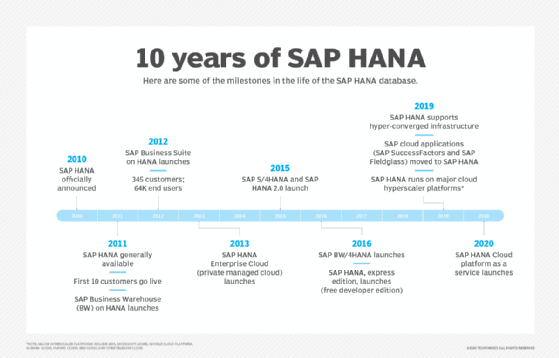
Kazmaier: In 2012, we moved and optimized our Business Warehouse application to HANA. In 2015, our ERP system followed and the whole S/4HANA movement started. Since then, SAP has moved more and more of its applications onto the HANA database. One of the highlights was putting SuccessFactors [SAP's HCM platform] on top of HANA, which processes on a peak day more than a billion transactions on HANA. One of the biggest shifts was the move to the cloud, and SAP becoming a cloud company powered by HANA specifically.
What were some of the biggest challenges in getting people to understand and accept the HANA value proposition?
Kazmaier: When SAP HANA started, it basically established a new baseline in database technology and data processing. When you try to shift the baseline, you can be surrounded by those who are not used to that. It required the market and academia a substantial amount of time to grasp the concept, to adopt it, to understand and embrace it. That's why SAP did not just exchange a database, but also started to build new and different applications like S/4HANA [an ERP platform]. Simplification and speed are the essence of HANA, and ultimately, it has created a digital innovation system. Data has become so incredibly important, everyone understands now that they have digital assets that they want to turn into value. They want to provide analytics -- predictive, and machine learning, and they want to incorporate customer data into it.
SAP HANA has been called 'translytical' over the years. What does this mean and why is it important?
Kazmaier: Transactions and analytics are usually thought of like water and oil, they don't mix well because it was thought that they were on opposing ends of optimizing data. Transactions are small amounts of data and writing, while analytics are large amounts of data and reading. What HANA did was unify both workload patterns into a common paradigm for data storage and data processing, which enabled them both to be processed at the same time. That created the notion of translytics, and suddenly application developers understood that in the translytical world, they can change how they can do transactions because they can make them analytics-based.
For instance, you can search to find the right product for a real-time sales promotion, or you can run a simulation to find the best depreciation model. On the analytics side, people realized that it's not just about getting to an answer, it's about triggering the right action, such as a promotion or employee engagement reach-out. That changes how you understand data processing by bringing two pieces together into one common form of data processing. The next piece will be when analytics and transactions unify with predictive analytics and machine learning, so that you can look into the future and find pattern correlations on the fly and make machine learning part of analytics processing.
What are some of the challenges that SAP HANA has to overcome to be used more across enterprises?
Kazmaier: The innovation of HANA is now interwoven with the innovation in the cloud. HANA as such a potent enterprise technology was always [most appropriate for] a large IT operation because of the infrastructure it requires. So, as a consequence, it was not democratic in the sense that everyone could have easy access at low costs, without worrying about infrastructure. Making it more democratic also includes using it for all sorts of data, not just high value data for which you would be willing to pay the premium of an in-memory database, but it could be any type of data like IoT low-value, low-density data.
So, is cloud the democratizing force?
Kazmaier: Because of the cloud, everyone can get the value and the potential of HANA without worrying about any of the infrastructure provisioning, about any of the data integration aspects, they basically subscribe to a service. There's hundreds of functions inside of HANA -- including geospatial, predictive, machine learning, transactions, OLAP -- that are all available immediately and it scales to any size of data. This is why the release of SAP HANA Cloud now is fitting for the 10th anniversary of HANA and will usher in the next 10 years of HANA innovation because it makes it more democratic.