
Photo-K - Fotolia
Quick copy/cut & paste tip using SAP Ctrl+Y
With the SAP Ctrl+Y feature, you can quickly copy text in SAP by simply highlighting it with your mouse.

Every computer, laptop, mobile and tablet user is familiar with copying and cutting data.
However, in SAP applications, these processes are slightly different. This tip covers a method to copy or cut and paste that is similar to what is used in applications such as Word, in addition to the "Quick Cut and Paste" function, along with other related information.
Copy and paste using Ctrl+Y, Ctrl+C, Ctrl+V
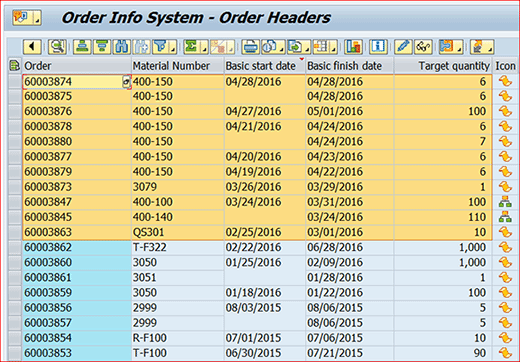
Figure 1 shows an example of what you would see when using an SAP application. Indeed, hundreds of the reports, features and analyses available in SAP ERP Central Component (ECC) have a window that looks very similar to what you see in Figure 1. The first step is to utilize the Select Block function, using Ctrl+Y to highlight what you want to copy, as shown in Figure 1.
Say you would like to selectively copy the information from a few fields in this report and paste it to another location, such as a Microsoft Word document or a PowerPoint presentation; you would need to follow these steps:
- To select the block containing the desired fields, first, press Ctrl+Y. Then, place the cursor at the top left-hand side of the block and drag the mouse until the desired fields are selected (the selected fields will change color, as shown by the yellow block in Figure 1).
- While the block of selected fields is highlighted, press Ctrl+C to copy the data to the clipboard.
- Then, place your cursor at the desired location (Word, Notepad, etc.) and press Ctrl+V to paste the copied material.
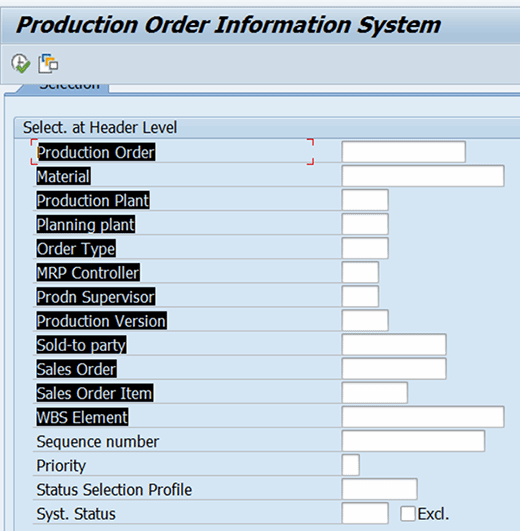
These three steps -- Ctrl+Y, Ctrl+C and Ctrl+V -- also work to copy a block of data from one group of fields in SAP to another group of analogous fields (fields which have the same width and depth) in SAP, whether the fields are numeric or have date or time formats. Figure 2 shows a block of fields selected using the Ctrl+Y step, all of which are highlighted in black.
Cut and paste using Ctrl+Y, Ctrl+X, Ctrl+V or just cut using Ctrl+Y, Ctrl+X
Cutting is very similar to copying, with one or two key differences depending on whether you are just cutting or cutting and pasting. To cut or cut and paste data from one group of fields to another:
- First, use the Select Block option (Ctrl+Y) and then select the fields to cut by dragging the mouse from the top left-hand corner until they are all selected.
- Then, use Ctrl+X to cut or remove the content of the selected fields. (This is the end of the process if you are just cutting.)
- To paste the content to its new location, place the mouse in SAP, Notepad, Word or any other selected location and press Ctrl+V.
This method of cutting is not only helpful for cutting and pasting the content of fields from one location to another, but also in the mass removal of incorrectly entered field information. The user no longer has to individually delete the incorrectly entered data from each field. Rather, the user can select a block of fields from which to cut.
The 'Quick Cut and Paste' function in SAP
While the Ctrl+Y, Ctrl+C and Ctrl+V approach is the typical way to select, copy and paste content, there's another method you might find easier.
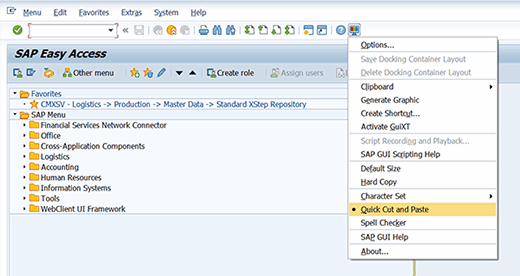
- On the standard SAP toolbar, click "Customizing Local Layout" (the computer icon beside the question mark icon) or press Alt+F12.
- Then, select "Quick Cut and Paste." Figure 3 shows how to choose this option. With this feature, you can copy text just by highlighting it using your mouse.
- To copy, right-click at the beginning of the text you want to copy and highlight it. At this point, your selected text will be copied to the clipboard.
- To paste the text from the clipboard, just place your mouse at the desired location and right-click.
This is very useful when copying SAP data from one field to another. One caveat is that this method won't work in the ABAP source code area in SAP 4.6c.
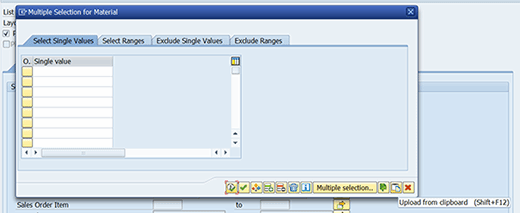
When running any SAP report, standard or flexible analysis, you can only select a range of values (see Figure 4). For example, the "Production Order" field (see Figure 2) shows a range of production orders that the system will display when executing this report. However, what if you wanted to view the production reports of specific production orders outside of the specified range, and not the entire range of production orders? This is possible by choosing the Multiple Selection icon located to the right of every field. (In Figure 4, the Multiple Selection icon is at the end of every line in yellow.) In this example, clicking the Multiple Selection icon for "Material" opened the window in Figure 5.
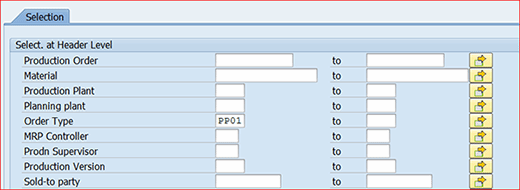
Figure 5 shows that you can enter a single value of materials ("Single value") or a range of values. You can also exclude individual materials or a range of materials while running any report in SAP by referring to the different tabs available for this purpose. If you have copied material data from another source, such as Microsoft Excel, and want to paste it into your SAP system, then you can choose "Upload from clipboard" and the system will paste all of the individual values.
Now, let's evaluate a different icon and how it can help in the copy function.
Figure 6 shows that if you already have a list of materials (or any other data) in a Notepad or text file, you can choose the icon "Import from Text File" and a pop-up will appear allowing you to navigate to the text file's location on your local or network drive to import the data into SAP. It's worth it to take the time to explore the other icons in Figure 6, as well as their functions.

Once you have mastered the different ways to select, cut, copy and paste, you can move on to exploring how to apply filters to different columns in a report so that the system displays only the user-defined fields, in addition to how to download an SAP report's data to Excel.