SAP BAPI (Business Application Programming Interface)

SAP BAPI (Business Application Programming Interface) is a standard interface to the business object models in SAP products.
BAPIs are the primary method through which customer code and third-party applications interact with SAP products. BAPIs wrap the internal layers of SAP's business object model to ensure that all business logic, validations and authorization checks are executed properly when accessing or changing business objects.
How BAPI works
BAPIs are implemented as function modules that call SAP internal code. Depending on which set of BAPIs is being used, they may call business object models defined using the Business Objects Processing Framework (BOPF) or legacy models defined using programs, tables and function modules.
BAPIs expose a formal and stable interface that developers of customer and third-party code can use to access and interface with SAP business objects in a way that SAP guarantees will work in the future. Accessing underlying tables and non-BAPI function modules, programs, and classes is also possible in SAP systems, but it does not come with the same guarantee that the code will work in the future or that the objects being accessed will even exist.
Such use of non-BAPI interfaces can result in problems during upgrades or require small patches if the signature of an internal function module changes, making the code that relies on it invalid.
SAP BAPI uses
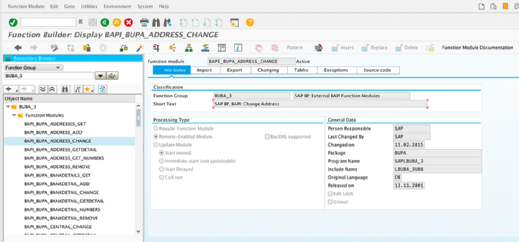
BAPIs are only supposed to be used by third-party or customer developers if they have been released, meaning SAP has designated them as ready for use and guaranteed to remain stable in the future. The release status can be checked by looking at the Released On date in the attributes section of the function module BAPI. If that field is blank, then the BAPI hasn't been released by SAP and should not be used.
To use an SAP BAPI in the Advanced Business Application Programming (ABAP) language, a developer uses ABAP's CALL FUNCTION to invoke the function module (see screenshot 1). Alternatively, most BAPIs are remote-enabled, meaning they can be invoked via Remote Function Call (RFC), web services or SAP's Java connector.
SAP BAPI features
There are BAPIs that enable full automation of most business processes in each SAP product that is based on the ABAP platform. The documentation for each SAP product offers some information about the available BAPIs. It can also be useful to search for function modules starting with BAPI in the SE37 and SE80 SAP transaction codes or ABAP for Eclipse.
Each BAPI function module should have extensive documentation available in multiple languages accessible through the Function Module Documentation option in SE37. It is important to read this documentation thoroughly because BAPIs vary widely in their structure and behavior, and they can sometimes work in unexpected ways or fail with cryptic error messages if their requirements are not met.
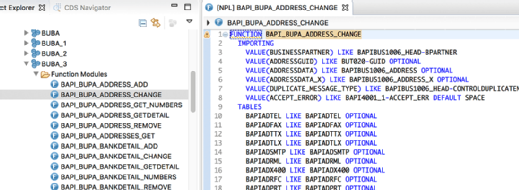
Many BAPIs have complex structures that mimic the underlying business object structures. The BAPI for modifying a business partner address shown in screenshot 2 -- the same CALL FUNCTION shown in screenshot 1 -- includes multiple importing structures, as well as a large number of tables parameters, which can pass additional information to and from the BAPI.
Two of the important parameters in screenshot 2 are ADDRESSDATA and ADDRESSDATA_X. This type of pairing is typical of BAPIs, where the second _X structure is a set of flags indicating exactly which fields should be updated.
BAPIs in practice
Because BAPIs are implemented as function modules, they do not fit naturally in the ABAP object-oriented programming (OOP) paradigm of classes, methods and interfaces. Nonetheless, they are usually implemented in an object-oriented way, as they are interfaces to SAP business objects.
In ABAP, these function modules can be called from programs, function modules or classes. It is often preferable to wrap BAPI calls in data access objects (DAOs), which are classes that encapsulate the calls to the BAPIs. Doing this enables unit testing with a mock version of the DAO, allowing testing of developer code separate from the testing of the BAPI calls themselves.