SAP ERP
SAP ERP is enterprise resource planning software developed by the company SAP SE. ERP, or enterprise resource planning, software is modular software made to integrate the main functions of an organization's core business processes into a unified system.
An ERP system consists of software components, called modules, that each focus on an essential business function, such as finance and accounting, HR, production, materials management or customer relationship management (CRM). Organizations only use the modules they need to run their particular business.
What does SAP stand for?
The original name for SAP as translated from German was System Analysis Program Development. The letters are pronounced individually. The "SE" in the full corporate name, SAP SE, stands for Societas Europaea, which is similar to the U.S. term, "Inc."
SAP is a multinational software vendor and the market-share leader in ERP. The company currently serves more than 180 countries and offers on-premises, cloud and hybrid deployment models, though cloud computing options are the focus of most of its development efforts.
What is SAP enterprise resource planning (ERP)?
SAP's various ERP products enable its customers to run their business processes, including accounting, sales, production, HR and finance, in an integrated environment, with data from each module stored in a central database. The close integration and common data store ensure that information flows from one SAP ERP component to another without the need for redundant data entry and help enforce financial, process and legal controls.
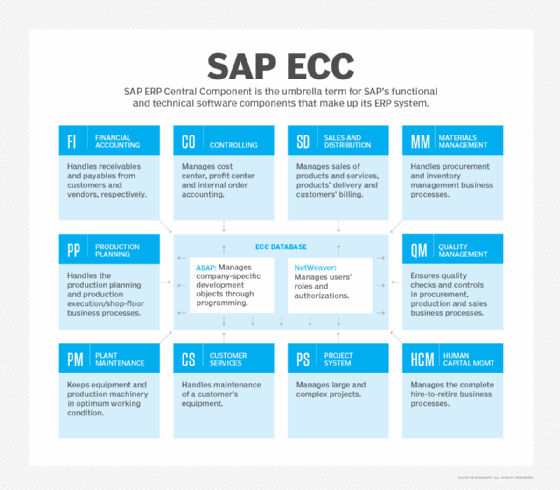
The most widely installed SAP system, SAP ERP Central Component (SAP ECC), is an on-premises ERP system that is usually implemented in medium-size and large companies.
At one time, the term "SAP ERP" was synonymous with ECC. Nowadays, it is a catchall for all of SAP's ERP products: ECC, S/4HANA, Business One and Business ByDesign.
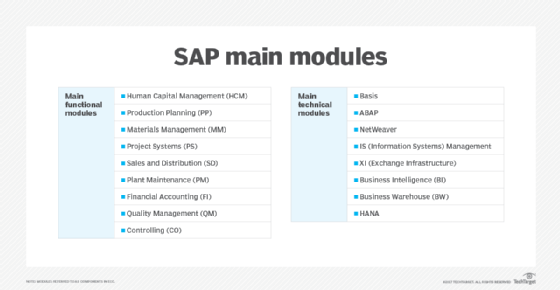
ECC remains SAP's flagship ERP and the basis of the next-generation product, S/4HANA. Its modules are separated into functional modules and technical modules. The functional modules include the following:
- Human Capital Management (SAP HCM)
- Production Planning (SAP PP)
- Materials Management (SAP MM)
- Project System (SAP PS)
- Sales and Distribution (SAP SD)
- Plant Maintenance (SAP PM)
- Finance and controlling (SAP FICO)
- Quality Management (SAP QM)
How does the SAP ERP system work?
As an on-premises ERP system, SAP ECC is usually deployed in a three-tier, client-server architecture. The three tiers are the presentation tier, the application tier and the database tier.
The presentation tier provides the user with the SAP graphical user interface (SAP GUI), which can be installed on any computer that uses Microsoft Windows or macOS. The SAP GUI is the point of communication between the user and ECC.
The application tier is the core of ECC. It is responsible for processing transactions, executing business logic, running reports, monitoring access to the database, printing documents and communicating with other applications.
The database tier is where the records of transactions and other data are stored.
Key SAP ERP features and capabilities
ECC is the ERP system at the center of SAP Business Suite, a broader collection of modules that handle other common business processes, such as supply chain management (SCM) and product lifecycle management (PLM).
S/4HANA is the vendor's in-memory ERP platform that was released in 2015. It is an ambitious rewrite of the Business Suite optimized for the SAP HANA in-memory database platform. S/4HANA is meant to reduce complexity, according to SAP, and to replace SAP ECC, eventually.
SAP S/4HANA Cloud is a SaaS version of S/4HANA, providing the advantages of HANA's in-memory processing and real-time data accessibility within a subscription-based SaaS model.
SAP Business ByDesign is a SaaS ERP system originally marketed to SMBs, but today it occupies the midmarket segment of the SAP product line. A fourth ERP product, SAP Business One, is geared to smaller business and runs on premises or in the cloud.
Advantages of SAP ERP
The main advantages of SAP ERP, especially the systems intended for large enterprises (ECC and S/4HANA) include the following:
- standardization of an organization's business processes;
- a unified view of the business;
- customizability; and
- strong reporting and analytics features that aid in decision-making.
Disadvantages of SAP ERP
- high purchase and implementation costs, including buying the software itself and the underlying infrastructure, labor costs of internal IT employees and external consultants, the costs of training employees and the residual costs of software maintenance and periodic upgrades; and
- the complexity of the system, which means implementations can take several years.
SAP software and ERP use cases
SAP software helps organizations to manage nearly every aspect of the business, from finances to HR, procurement and logistics.
Business Suite includes a broad range of business applications as well as industry-specific functionality. Besides ECC, it includes modules for CRM, PLM, SCM and supplier relationship management (SRM).
Among the industry-specific applications in Business Suite or S/4HANA are the following:
- Consumer Industries, including Agribusiness; Consumer Products; Fashion; Life Sciences; Retail; and Wholesale Distribution.
- Discrete Industries, including Aerospace and Defense; Automotive; High Tech; and Industrial Manufacturing.
- Energy and Natural Resources, including Building Products; Chemicals; Mill Products; Mining; Oil, Gas and Energy; and Utilities.
- Financial Services, including Banking and Insurance.
- Public Service, including Defense and Security; Federal and National Government; Future Cities; Healthcare; Higher Education and Research; and Regional, State and Local Government.
- Service Industries, including Cargo Transportation and Logistics; Engineering, Construction and Operations; Media; Passenger Travel and Leisure; Professional Services; Sports and Entertainment; and Telecommunications.
History of SAP
SAP was started in 1972 by five former IBM employees in Mannheim, Germany. The original idea for SAP was to provide customers with the ability to interact with a common corporate database for a comprehensive range of applications in real time.
In 1973, SAP released R/1, a financial accounting system. R/1 ran on IBM servers and disk operating systems (DOS), and it had a single-tier architecture in which presentation, applications and data were on one platform.
In 1979, SAP released R/2, a mainframe system that provided real-time data processing across accounting, manufacturing, supply chain and human resources. R/2 used a two-tier architecture, where presentation was on one platform and applications and data were on another. R/2 helped power SAP's growth, and the vendor expanded its customer base to about 200 companies.
In 1992, SAP released R/3, which represented a switch from mainframe computing to the client-server model, and from a two-tier to a three-tier architecture, in which presentation, applications and data were housed separately. R/3 was a critical product for SAP that launched the company onto the world stage.
In 2004, the company launched SAP NetWeaver, which received a lot of industry attention as the first fully interoperable, web-based, cross-application platform that could be used to develop not only SAP applications, but others as well. Also, in 2004, the successor to R/3, SAP ECC, was released.
In 2009, SAP Business Suite 7 became available to customers worldwide. This version used a service-oriented architecture.
In 2011, the company launched SAP HANA, an in-memory database platform that is at the forefront of the company's current strategy. HANA was a major development project for SAP, which has said it intends HANA to take the place of the traditional databases SAP has used for its business applications.
Since 1996, the company has also made more than 60 acquisitions. A major focus for the company in recent years has been building its cloud computing capabilities and enabling greater mobility. Some of the more prominent acquisitions include the following:
- Qualtrics, 2018, experience management, later spun out by SAP;
- CallidusCloud, 2018, sales team performance management;
- Concur Technologies, 2014, online travel and expense management software as a service, the largest acquisition to date;
- Fieldglass, 2014, cloud-based contingent labor and services;
- Hybris, 2013, e-commerce;
- Ariba, 2012, cloud-based B2B marketplace;
- SuccessFactors, 2011, SaaS HCM; and
- BusinessObjects, 2007, business intelligence.
The future of SAP
By 2022, SAP was firmly focused on continuing to move more customers to the cloud and S/4HANA, and using both as platforms to deliver leading-edge technologies, especially AI, IoT, big data and advanced analytics.
The broader vision is to help customers build the "intelligent enterprise," a new kind of organization that takes advantage of AI, ubiquitous networking and more human-centric user experiences to become more adaptive, innovative and ultimately successful. At the same time, SAP leadership has said technology must be put to the service of a more environmentally sustainable world.