


Tomcat vs. JBoss: Compare features of these Java app servers
Two of the most widely used Java application servers today are Apache Tomcat and Red Hat's JBoss Enterprise Application Platform. Both servers can handle development and production, but how do you pick the one that's right for you?
There are many factors to weigh in a Tomcat vs. JBoss comparison, including functionality, tooling, licensing, community support and the various Java APIs in use.
JBoss vs. Tomcat API support
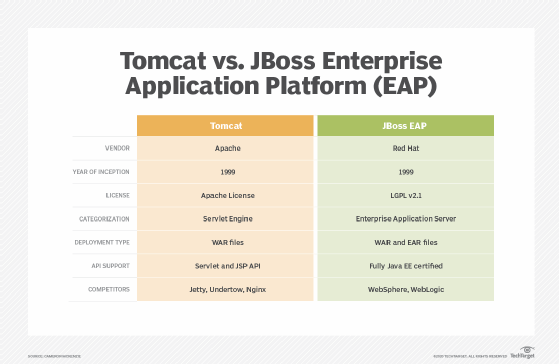
The most significant difference in a Tomcat vs. JBoss comparison is that JBoss is a certified Java EE compliant application server. JBoss not only provides support for the Servlet and Java Server Page (JSP) specification, but also support for JAX-RS web services, Contexts and Dependency Injection (CDI), Java Message Service, JavaMail and Java Naming and Directory Interface.
In contrast, Tomcat is simply a Servlet engine. Tomcat's primary focus is to provide an implementation of the Servlet and JSP specification. Tomcat also supports a few complementary APIs such as WebSockets, the Java Authentication Service Provider Interface for Containers and the expression language API.
Tomcat isn't Java EE Web Profile compliant either. It lacks inherent support for many useful enterprise development APIs such as CDI, Java Transaction API, JavaServer Faces (JSF), Hibernate and JPA. JBoss has existing support for all of these APIs.
However, it is possible to add support for APIs such as JSF and CDI to Tomcat by integrating projects like Weld and Mojarra. A separate Apache project named TomEE allows for this support, but the basic Apache Tomcat download does not.
Tomcat vs. JBoss licensing
There is one notable difference between the two servers: JBoss and Tomcat have different licensing models.
JBoss uses the GNU Lesser General Public License (LGPL), also known as a copyleft license. Teams that use JBoss must distribute derivatives of LGPL software with the same license.
Tomcat is part of the Apache license, which lets users distribute or modify the software without restriction. The Apache license is not copyleft.
Furthermore, while JBoss EAP is open source and LGPL-licensed, JBoss Enterprise Middleware requires a support subscription. "If you want to use JBoss for production, then you would buy a subscription," said James Falkner, technical product manager with Red Hat Runtimes. "But for developers or for evaluation purposes you can certainly download JBoss EAP off of the developer website at Red Hat."
JBoss is built on the open source project called Wildfly, which also has an LGPL. Enterprises can use the uncertified Wildfly product in production without the need to purchase a subscription license from Red Hat. Many modern microservice deployments use Wildfly.
Another key difference between Tomcat and JBoss is the fact that Red Hat provides paid vendor support for its EAP offering. The Apache Software Foundation doesn't provide paid support for its products, so production issues with Tomcat instances would require involvement from a third-party vendor.
Tomcat vs. JBoss Web Server
Red Hat just happens to be one of the third-party vendors a developer can reach out to for production support for Tomcat. Red Hat has a product called JBoss Web Server which is just Tomcat under the covers. "We don't try to hide the fact that it's Tomcat underneath," Falkner said. "It's all that you get in the upstream Tomcat. So really what we're providing is Tomcat support along with support for additional modules above and beyond the base servlet container in Tomcat itself."
Unfortunately, JBoss Web Server has created some confusion in the marketplace with regard to Tomcat and JBoss EAP. Some developers are under the misguided impression that Tomcat is the web container inside JBoss EAP. In fact, Undertow is the default web server used by both Wildfly and JBoss but not Tomcat.
Additional tools and features
Given the fact that JBoss EAP is a revenue generating product, it's not surprising to learn that Red Hat bundles a variety of tools into its product to simplify configuration, runtime management and server administration. JBoss offers a modern looking management console, feature-full command-line tools and various utilities that integrate with DevOps tools such as Ansible and Puppet.
In contrast, Apache Tomcat is primarily focused on providing a standard, bug-free implementation of the Servlet and JSP API. Tomcat provides a basic administrative console to manage applications, but the extent of its available tooling is minimal in comparison to JBoss.
When to choose JBoss over Tomcat
The two most compelling reasons to choose JBoss over Tomcat are a need for full Java EE support in the application server, and the ability to obtain paid support from a reputable vendor. The various tools that improve JBoss' ease of use and provide integration with popular DevOps tools are also key features that make it an attractive choice compared to Tomcat. If these criteria make JBoss an attractive choice, you might also want to evaluate WebSphere as well.
When to choose Tomcat over JBoss
Apache Tomcat is a reasonable choice for developers that want a basic Servlet and JSP engine with a highly permissive license, but who don't mind paying for vendor support. If this is your category, compare Tomcat and Jetty to see which server suits your enterprise needs the best.
There are stark differences between the Java EE compliant JBoss EAP server from Red Hat and the basic Servlet engine provided by the Apache Software Foundation. The Java community is richer for these differences and the different options that developers can choose for their enterprise.