Home > SAP Tips > SAP best practices > How to transport table entries
SAP Tips:
EMAIL THIS
 TIPS & NEWSLETTERS TOPICS 

SAP BEST PRACTICES

How to transport table entries


Chandrasekhar Jagarlamudi
01.26.2007
Rating: -4.28- (out of 5)


Digg This!    StumbleUpon Toolbar StumbleUpon    Bookmark with Delicious Del.icio.us   


Sometimes when we try to modify and save the data for some transactions, the system will not ask for a customizing request. But if we know which tables will be updated by those transactions, we can create one transportable request, save the entries and transport them to different servers.

This can be useful when the number of entries is not too overwhelming, say, less than 500.

I had seen some questions regarding the same and answered them, so now I am formatting my answer as a blog. The following procedure will take you through the process.

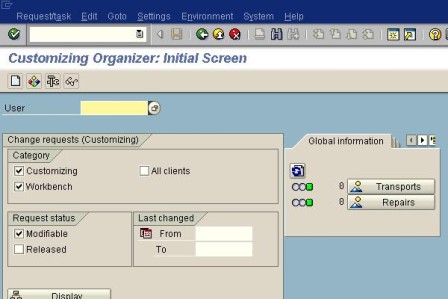
Go to Transaction SE10.
Give the userid and click on Display.
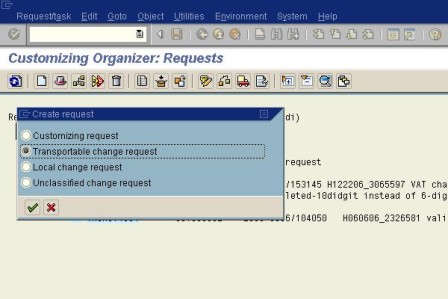
Click on the Create button and select the second radio button 'Transportable Change Request', which will create a new request.
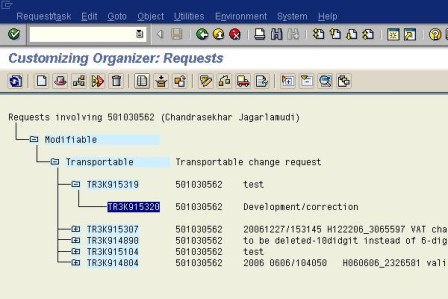
Now place the cursor on the task and click on the button 'Display object list', which is next to the Delete button.
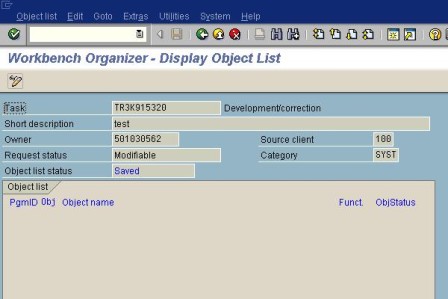
Click on the Change button and then the Add button.
Give PgmId as R3TR
Obj as TABU
Objectname as Table to be transported
as shown below, and then double click on the table name, in this case SKA1.
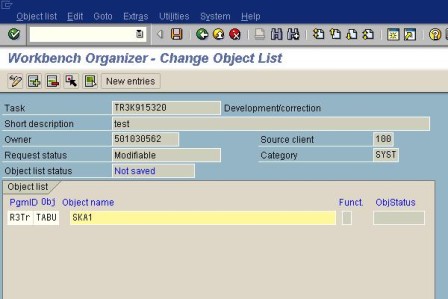
Double click on the Key field.
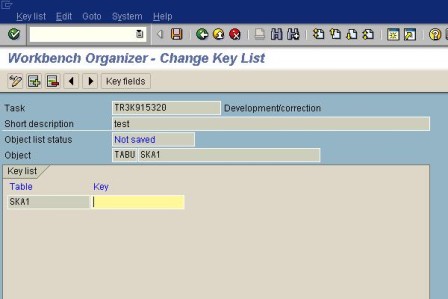
Fill in the details.
These are the key fields of that table which will transport the particular record.
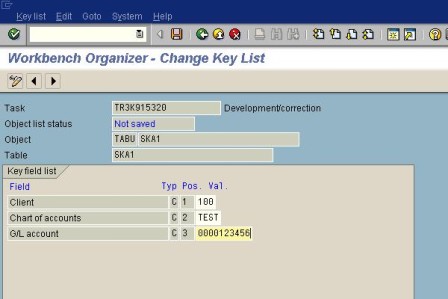
Now click on back button then add(Plus button) to add more entries to be transported.
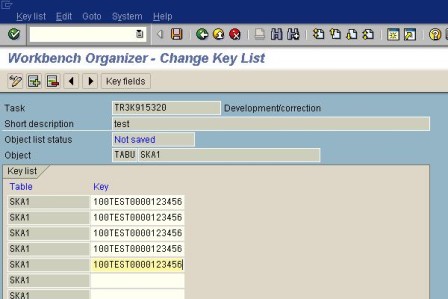
Again click on the Back button and add more tables and follow the same procedure for each table.
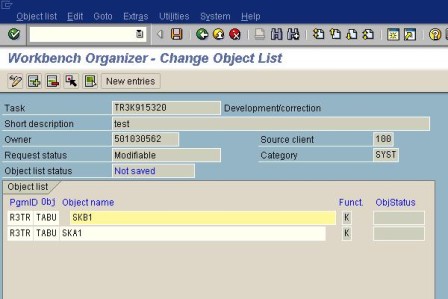
Finally, save the task, which is ready to be transported.

Chandrasekhar Jagarlamudi is a developer for Intelligroup


This content is reposted from the SAP Developer Network.
Copyright 2007, SAP Developer Network

SAP Developer Network (SDN) is an active online community where ABAP, Java, .NET, and other cutting-edge technologies converge to form a resource and collaboration channel for SAP developers, consultants, integrators, and business analysts. SDN hosts a technical library, expert blogs, exclusive downloads and code samples, an extensive eLearning catalog, and active, moderated discussion forums. SDN membership is free.

Want to read more from this author? Click here to read Chandrasekhar Jagarlamudi's Weblog. Click here to read more about ABAP on SDN.




Rate this Tip
To rate tips, you must be a member of SearchSAP.com.
Register now to start rating these tips. Log in if you are already a member.


Submit a Tip


Digg This!    StumbleUpon Toolbar StumbleUpon    Bookmark with Delicious Del.icio.us   


RELATED CONTENT
SAP best practices
Select Text fields: Case-insensitive
Finding BADIs you can use
Updating an RT table entry in SAP HR Payroll -- without the ADDWTE option
Is this the quickest way to find a BADI?
Adding custom fields for retail product comparisons in SAP BW
ABAP Objects in SAP Workflow to provide improved performance
Top 10 SAP tips of 2007
Retrieve BI data with Web Services
Eliminate database read/write times with ABAP shared memory
Model-driven development in the enterprise

RELATED RESOURCES
2020software.com, trial software downloads for accounting software, ERP software, CRM software and business software systems
Search Bitpipe.com for the latest white papers and business webcasts
Whatis.com, the online computer dictionary

DISCLAIMER: Our Tips Exchange is a forum for you to share technical advice and expertise with your peers and to learn from other enterprise IT professionals. TechTarget provides the infrastructure to facilitate this sharing of information. However, we cannot guarantee the accuracy or validity of the material submitted. You agree that your use of the Ask The Expert services and your reliance on any questions, answers, information or other materials received through this Web site is at your own risk.

HomeNewsTopicsBlogsTipsAsk the ExpertsMultimediaWhite PapersProducts
About Us  |  Contact Us  |  For Advertisers  |  For Business Partners  |  Site Index  |  RSS
SEARCH 
TechTarget provides enterprise IT professionals with the information they need to perform their jobs - from developing strategy, to making cost-effective IT purchase decisions and managing their organizations' IT projects - with its network of technology-specific Web sites, events and magazines.

TechTarget Corporate Web Site  |  Media Kits  |  Reprints  |  Site Map


All Rights Reserved, Copyright 2000 - 2008, TechTarget | Read our Privacy Policy
SearchSAP.com is a search service provided by TechTarget and is completely
independent of and not affiliated with SAP AG.
  TechTarget - The IT Media ROI Experts