
Victoria - Fotolia
How IT admins can use PowerShell to monitor CPU usage
IT administrators that are familiar with PowerShell can use certain scripts to monitor CPU performance on desktops to determine the root cause of desktop performance issues.

On end-user machines, hardware resource utilization can lead to poor UX, and some admins struggle with monitoring and managing resource use.
Identifying when desktops are using resources at an unhealthy level is important because it can severely hinder users from getting their work done, leading to frustration and lowered productivity.
Some of the typical culprits for excessive resource use are outdated hardware, processes that are running in the background, or memory leaks. As a desktop administrator, when you look at a Windows desktop's CPU utilization and it's at 99%, chances are the user's desktop has significant performance issues.
In an enterprise organization, using PowerShell to monitor CPU usage on end-user machines may seem like a tedious task -- and if you perform it manually, it will be. However, there are various tools that can automate this process.
There are several monitoring tools native to Windows desktops, including the Task Manager, the resource monitor and the performance monitor. One tool that admins may overlook is PowerShell. If you are comfortable using PowerShell for other tasks, monitoring CPU usage should be relatively easy and quick.
Step-by-step: Using PowerShell to monitor CPU usage
At some point in time, most Windows users have opened and viewed Task Manager to inspect the current resource utilization. You can open the PowerShell equivalent of this view by looking at the win32_processor Windows Management Instrumentation (WMI) class.
First, run the PowerShell command to get the average load percentage right now across your organization's desktops. Because Get-WMIObject is no longer supported in PowerShell 7, you can use Get-CimInstance to query the WMI class instead. In this example, the command would look like this.
C:\Users\dan> Get-CimInstance win32_processor | Measure-Object -Property LoadPercentage -Average
The results will display in several fields, shown below:
Count: 1
Average: 10
Sum:
Maximum:
Minimum:
Property: LoadPercentage
In this example, you can see the average is 10, which indicates 10% average CPU use across the specified desktops. Ten percent is relatively low, and it indicates a healthy amount of CPU use.
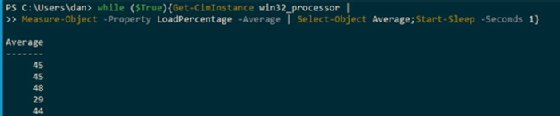
The next step is to get a running total of the load percentage of the CPU use. A simple PowerShell 'while' loop will serve your purpose in this instance. To keep the loop running until you want to end it, use the $True variable in PowerShell.
Then, pipe Get-CimInstance to Measure-Object to get the average. After that, navigate to Select-Object so that you only display the average property. Finally, enter the sleep utility after each command execution.
Finding the processes using the most CPU
Another common use case you may find for PowerShell's CPU usage monitoring on Windows desktops is to identify the processes that are taking up the most CPU. To do this, you can use Get-Counter, which uses native Windows performance counters to monitor and measure resources.
Use the counter '\Process(*)\% Processor Time' with Get-Counter in PowerShell. The most valuable data from this is "cookedvalue," which is the readable view of the data. In this case, the data displays as a percentage.
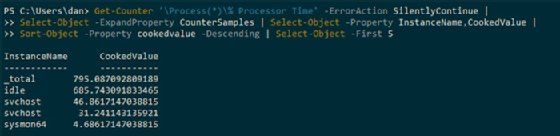
Keep in mind, this script takes all of the logical processors on a machine into account, which is why the cookedvalues add up to over 100%.